

HELP CENTER
Our Knowledge Hub: Articles & Online Events
Explore expert-written articles, industry research, and interactive webinars designed to empower recruiters, HR leaders, and hiring managers. Whether you're scaling your team or optimizing your process, our curated content helps you stay ahead in a competitive talent market.
Discover More
Discover More
How AI Interview Scheduling Software Saves Recruiter Hours
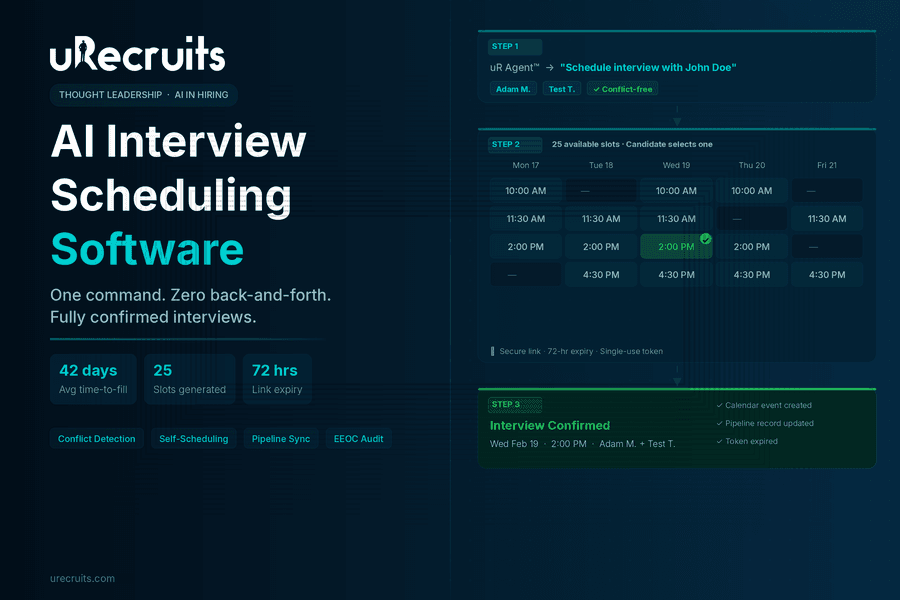
Ask any recruiter what the most frustrating part of their job is, and scheduling interviews comes up almost every time. Not because it is intellectually difficult work. Because it is time-consuming, repetitive, and prone to the kind of back-and-forth that stalls the entire hiring process. A qualified candidate applies on Monday. By Friday, nobody has confirmed a time. By the following Monday, that candidate had accepted an offer somewhere else. This is not a small problem. The coordination overhead of scheduling an interview at scale, multiplied across dozens of open roles, dozens of candidates, and multiple interviewers per role, consumes a disproportionate share of recruiter bandwidth. The hours a recruiter spends wrangling calendar availability are hours not spent evaluating fit, building relationships with candidates, or closing offers on top talent. AI changes this. Not by removing humans from the equation, but by removing the coordination tasks that should never have been handled by humans in the first place. This guide covers what modern interview scheduling software does, what separates genuine AI scheduling from basic calendar tools, and how uRecruits' Scheduler Agent handles interview scheduling from a single recruiter command through to a confirmed, conflict-free calendar event. Why Interview Scheduling Is a Bigger Problem Than Most Teams Acknowledge The coordination cost of scheduling interviews sits in a blind spot for many organizations. It does not show up as a discrete budget line. It lives in recruiter inboxes, in back-and-forth email threads, in the three-day gap between a candidate clearing a phone screen and getting a calendar invite for the next stage. According to SHRM, the average time-to-fill an open position in the United States is between 36 and 42 days. A significant portion of that window is not spent evaluating candidates. It is spent on logistics: finding times that work, sending calendar invites, handling reschedules, and chasing confirmations. Every day that coordination takes longer is a day a strong candidate could accept a competing offer. A LinkedIn global talent trends report found that slow hiring processes are among the most common reasons qualified candidates disengage before an offer is made. Candidates who experience long gaps between stages, particularly between screening and the first formal interview, report significantly lower satisfaction with the hiring experience regardless of the outcome. The operational math is straightforward. A recruiter handling 15 open roles simultaneously, each requiring two to three rounds of interviews with two to three interviewers per round, is managing the scheduling logistics of anywhere from 60 to 135 individual interview coordination tasks. Each task requires finding availability, sending communication, waiting for replies, handling changes, and confirming final details. At scale, that is not a rounding error on recruiter time. It is the majority of it. This is the environment in which automated interview scheduling software delivers its most concrete value. What Interview Scheduling Software Actually Does The category of interview scheduling tools covers a wide spectrum. At the basic end, you have tools that make it easier to share calendar links. At the other end, you have AI-powered scheduling agents that handle the entire coordination workflow from a plain language command, including slot generation, conflict detection, candidate communication, calendar confirmation, and record-keeping, without any manual steps. Understanding what each layer of the category actually does helps clarify what your team is actually getting when evaluating job interview scheduling software. Basic Calendar Link Tools These tools let recruiters or candidates share a link to a calendar with open slots. The candidate picks a time. An invite goes out. This eliminates one round of back-and-forth but still requires a recruiter to manually set up availability windows, manage which interviewers are included, and handle any follow-up if the initial slot does not work. They are useful but they do not qualify as AI interview scheduling software. Integrated Scheduling Within an ATS Some ATS platforms include scheduling modules that connect candidate profiles to calendar workflows. The value here is integration: the scheduled interview is linked to the candidate record, interviewers receive the right context, and the outcome is recorded in the hiring pipeline. This is more functional than a standalone link tool but often still requires manual setup per candidate. AI-Powered Scheduling Agents This is where the category takes a qualitative step forward. A genuine interview scheduling AI agent accepts a plain language command from a recruiter, identifies the candidate and the relevant interviewers, generates available time slots, handles conflict detection across all interviewer calendars simultaneously, sends a secure self-scheduling link to the candidate, creates the calendar event automatically when the candidate selects a slot, and updates the hiring pipeline record with all relevant details. The recruiter issues one command and the workflow completes. This is how uRecruits' Scheduler Agent works. How uRecruits Scheduler Agent Handles Interview Scheduling End to End uRecruits includes the Scheduler Agent as one of five live agents within uR Agent™, the platform's AI console. The Scheduler Agent is purpose-built for candidate interview scheduling software within a connected hiring workflow. It is not a standalone add-on. It is built into the same pipeline that handles resume parsing, AI pre-screening, assessments, and offers. Here is what the end-to-end flow looks like. Step 1: Recruiter Issues One Command The recruiter types a plain language instruction in the uR Agent™ console: "Schedule interview with John Doe." The Scheduler Agent identifies the candidate, validates their eligibility and pipeline stage, confirms the next interview round from the Position Workflow, and surfaces the available team members who can serve as interviewers. The recruiter selects which team members to include. That is the full extent of manual input required. Step 2: Automatic Slot Generation With Conflict Detection Once interviewers are selected, the Scheduler Agent generates 25 available time slots automatically. Slots run from 10 AM to 7 PM, skip weekends, and are set at 30-minute durations. Before presenting slots to the candidate, the system runs conflict detection across all selected interviewers' calendars simultaneously. Only slots where all selected interviewers are available are offered. There is no manual calendar cross-referencing by the recruiter. Step 3: Secure Self-Scheduling Link Sent to Candidate The system generates a secure, token-based scheduling link using UUID v4 with a 72-hour expiry window. The link is single-use: once the candidate selects a slot, it becomes invalid. The candidate receives an email with their interview panel listed, the 72-hour deadline clearly stated, and instructions to select exactly one slot. They do not receive a list of all 25 slots in the email. They click the link, see the available slots in a clean scheduling interface, and confirm their selection. Step 4: Booking Confirmation and Calendar Event Creation When the candidate selects a slot and confirms, the system runs a final conflict check in real time: it verifies that each selected interviewer is still available at the chosen time. If no conflict exists, it creates the calendar event automatically, updates the hiring pipeline record with the interview date, interviewers, and event ID, and marks the scheduling token as used. The candidate sees a confirmation immediately. The recruiter does not need to take any further action. If a conflict has emerged since the slots were generated, the system returns a conflict notification and prompts the candidate to select an alternate slot. The recruiter is never required to intervene manually. uRecruits Interview Scheduler Agent Recruiter issues one command. Agent validates eligibility, surfaces interviewers, generates 25 conflict-checked slots, sends a secure self-scheduling link with 72-hour expiry, creates the calendar event on candidate confirmation, updates the pipeline record, and marks the token as used. One command from the recruiter. Zero manual coordination steps. What Makes This Genuinely Different From Basic Interview Scheduling Tools The interview scheduling software market includes tools at very different levels of capability. What separates the Scheduler Agent from basic interview scheduling tools comes down to four structural differences. It Is Connected to the Hiring Pipeline, Not Separate From It Most standalone online interview scheduling software tools operate outside the ATS. A recruiter copies a link, pastes it into an email, and hopes the outcome gets recorded somewhere. In uRecruits, the Scheduler Agent operates inside the hiring workflow. The interview round it schedules is defined by the Position Workflow already attached to the job. The outcome is recorded directly on the candidate's profile in the ATS pipeline. There is no manual data entry between the scheduling action and the pipeline record. Conflict Detection Is Structural, Not Manual When using basic calendar link tools, double-booking is the recruiter's problem to prevent. They have to check each interviewer's availability manually before sending a scheduling link. uRecruits' conflict detection runs automatically both at slot generation and at booking confirmation. If a conflict exists, it is caught before the candidate ever sees the slot. If a conflict emerges between slot generation and candidate booking, it is caught at the point of confirmation. The system prevents double-booking structurally. Security Is Built In, Not Added On The scheduling link uses UUID v4 token generation with a 72-hour expiry and single-use enforcement at the database level. The candidate cannot reuse the link after selecting a slot. The link expires automatically if unused within 72 hours. These are not policy guardrails. They are architectural controls that protect both the candidate experience and the integrity of the scheduling data. HR/Recruiter Stays in the Loop on Every Action The Scheduler Agent proposes every action and waits for recruiter confirmation before sending the scheduling email. The recruiter selects which interviewers to include. The agent surfaces the available slots and asks for confirmation before the email goes out. No scheduling action executes without recruiter awareness and approval. This is what uRecruits calls HR/Recruiter-On-Loop: full oversight of every automated action, visible, reviewable, and reversible. The Candidate Experience: Why Self-Scheduling Changes Completion Rates One of the underappreciated dimensions of how to schedule an interview well is the candidate experience. When a recruiter sends a list of three time options and asks the candidate to reply with their preference, the candidate has to check their calendar, reply, wait for confirmation, and then add it manually. Each friction point in that chain is an opportunity for drop-off. According to a Forbes analysis of candidate experience in competitive hiring markets, simplicity and speed in the interview scheduling process directly correlate with candidate acceptance rates. Top candidates, who typically have multiple active processes running simultaneously, respond more positively to hiring experiences that respect their time. A self-scheduling link that takes under two minutes to complete signals efficiency and professionalism. The uRecruits candidate scheduling experience is built around this principle. The candidate clicks one link, sees a clean list of 25 available slots with clear date and time labels, selects one, and gets an immediate confirmation. The entire interaction takes under two minutes. They do not need to create an account. They do not need to reply to an email. They do not need to coordinate with anyone. The software to schedule interviews handles everything on their side automatically. The 72-hour expiry window creates appropriate urgency without being aggressive. The single-use enforcement prevents confusion from multiple selections. The interview panel is listed in the email so the candidate knows who they will be speaking with before they confirm. These details compound into a scheduling experience that reflects positively on the hiring organization. How to Schedule an Interview With uRecruits: A Realistic Walk-Through The best way to understand what ai interview scheduling software actually delivers is to walk through a real scenario. Here is what scheduling looks like using the uRecruits Scheduler Agent. The recruiter opens uR Agent™ and types: "Schedule interview with John Doe." The agent identifies John Doe as a candidate in the active pipeline for the Nurse role, confirms his eligibility based on the Position Workflow, and identifies the next round: HR Audio Video Interview. The agent surfaces the available interview panel. It lists available team members with their names and email addresses. The recruiter types "1 and 2" to select Adam Markram and Test Test as the interview panel. No additional input is required. The agent generates 25 conflict-free slots and asks: "Would you like me to send the scheduling email to John Doe?" The recruiter confirms. The email goes out immediately to john.doe@email.com. John Doe receives the scheduling email with the interview panel listed, a 72-hour deadline clearly stated, and a single call to action: click the link to select a slot. He clicks the link, sees the 25 available time slots displayed with full date and time labels, and selects Wednesday, Feb 19 at 2:00 PM. The system runs a real-time conflict check. Adam Markram is available at 2:00 PM. Test Test is available at 2:00 PM. No conflict. The interview is booked. A calendar event is created automatically. The pipeline record for John Doe is updated with the interview date, the interview panel, and the event ID. The scheduling token is marked as used and the link expires. John Doe sees a confirmation: "Interview scheduled for Feb 19 at 2:00 PM." The recruiter received no follow-up emails, made no manual calendar entries, and sent no back-and-forth messages. The entire scheduling interview workflow completed from a single command. What the Interview Scheduling Software Market Gets Wrong The broader interview scheduling software market has grown significantly in recent years as organizations recognized that manual scheduling was one of the clearest bottlenecks in hiring velocity. But not every solution in the market approaches the problem the same way, and some common approaches leave critical gaps. The most common gap is isolation from the hiring pipeline. A recruiter using a standalone interview scheduling tool still has to manually copy candidate information, select interviewers outside the system, link the scheduled event back to the ATS, and confirm the record is updated correctly. Each handoff is a potential error and a time cost. The efficiency gain from scheduling automation is partially offset by the data management overhead it creates. A second gap is the absence of conflict detection. Many software for interview scheduling tools show interviewers' calendars without cross-referencing them. If two interviewers have overlapping commitments on a day that appears free in one view, double-booking can still occur. Structural conflict detection, where the system checks all interviewer calendars simultaneously before surfacing a slot, is a meaningful technical distinction. A third gap is the treatment of candidate data security in scheduling flows. Links that do not expire, links that can be used multiple times, and scheduling flows that require candidates to create accounts all introduce friction or risk. Secure token-based links with defined expiry windows and single-use enforcement protect both parties without adding steps. uRecruits' Scheduler Agent addresses all three gaps by design: connected pipeline, structural conflict detection, and secure token-based links. Interview Scheduling in the US: What Compliance and Consistency Require For organizations operating interview scheduling software in the US, there are practical compliance considerations that go beyond calendar coordination. Structured hiring processes, consistent scheduling workflows, and auditable records of who interviewed which candidates and when are all components of a defensible EEOC-compliant hiring process. According to SHRM, employment law best practices consistently recommend structured interview processes with documented, consistent evaluation criteria. The scheduling layer is part of this. When scheduling is ad hoc, inconsistencies emerge: some candidates get more interview panel members, some get shorter time slots, some move through rounds faster than others with no documented rationale. uRecruits' approach to job interview scheduling software addresses this through the Position Workflow. Every interview round is defined in the workflow before the job publishes. The Scheduler Agent schedules interviews against that defined structure, not ad hoc. Every scheduling action is logged. Every calendar event is tied to a specific candidate record and interview round. Every interviewer selection is recorded. The audit trail is automatic, not manual. For HR teams that need to demonstrate consistent process across all candidates for a given role, the connected workflow approach is a structural advantage over standalone scheduling tools that operate outside the hiring system. Who Benefits Most From Automated Interview Scheduling Software Recruiting Teams Managing High Volume Teams with 15 or more active roles simultaneously gain the most from automated interview scheduling software. The coordination overhead that a small number of open roles makes manageable becomes genuinely unworkable at scale. A Scheduler Agent that handles 50 scheduling workflows simultaneously does not slow down the way a recruiter managing the same load manually would. Every role gets the same response speed regardless of how many are open at once. Staffing Agencies Running Multiple Client Pipelines Staffing agencies face the additional complexity of coordinating interviews between client interviewers and candidates the agency is placing. The Scheduler Agent handles multi-interviewer scheduling regardless of whether the interviewers are internal team members or client contacts, as long as they are configured in the platform. Agencies running multiple client pipelines in parallel get consistent scheduling quality across all of them without proportional increases in coordinator headcount. Small Businesses Without a Dedicated Recruiting Coordinator For small businesses where a hiring manager is also the recruiter, the logistics of scheduling interviews often fall through the gaps because nobody owns them as a dedicated function. A Scheduler Agent that handles the coordination automatically gives any hiring manager the same scheduling infrastructure that large recruiting teams use without requiring a dedicated coordinator role. HR Teams That Need Consistent, Auditable Process HR teams focused on compliance and fair hiring practices benefit from the audit trail and process consistency that a connected top interview scheduling software solution creates automatically. Every scheduling decision is logged. Every interviewer selection is recorded. Every candidate gets the same self-scheduling experience regardless of which recruiter initiated the workflow. Evaluating the Best Interview Scheduling Software: Questions Worth Asking When evaluating best interview scheduling software options, the feature list is less useful than a set of workflow questions that surface how the tool actually operates in practice.
- Does it connect to your ATS or operate separately? Standalone scheduling tools create data management overhead. Integrated scheduling that records outcomes directly in the candidate pipeline eliminates it.
- Does it run real-time conflict detection across all interviewers? Conflict detection after the fact, or manual calendar cross-referencing, is not structural protection against double-booking. Ask how conflicts are caught and when.
- How is the scheduling link secured? Single-use enforcement, defined expiry windows, and token-based authentication protect both parties. Open or reusable links create risk and confusion.
- Can the recruiter issue a scheduling command in plain language? If the recruiter still has to configure availability windows, copy candidate emails, and set up the scheduling workflow manually, the AI label is cosmetic, not functional.
- Does the scheduling action require HR/Recruiter confirmation before executing? An agent that proposes the action and waits for approval is structurally different from one that sends emails autonomously. Oversight matters.
- Is the outcome automatically recorded in the hiring pipeline? If the recruiter has to manually update the ATS after scheduling, the efficiency gain is partial. Full integration means zero post-scheduling data entry.
- Is it accessible on web and mobile? Recruiters reviewing pipelines from their phones need scheduling functionality that works on any device. Desktop-only scheduling tools limit flexibility.

Written by
Thomas Alexander
Admin
The Complete Guide to Recruitment Software: What AI Changes for Every Hiring Team
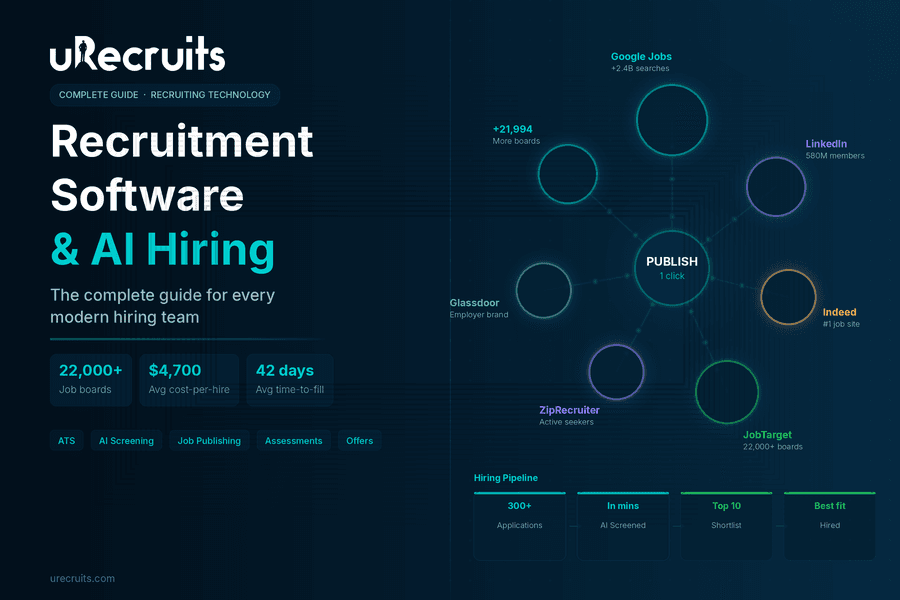
Hiring has always been hard. But the version of hard that most recruiting teams deal with today is different from what it was five years ago. Inboxes fill up with hundreds of applications for a single role. Phone screens take days to schedule. Qualified candidates drop off because the process moves too slowly. And the team responsible for fixing all of this is usually the same size it has always been. This is where recruitment software comes in and why the AI-powered version of it represents a genuine shift rather than a marginal improvement. The right platform handles the coordination work that eats recruiter time, brings in candidates across thousands of channels at once, and keeps human decision-makers fully in control at every stage that actually matters. This guide breaks down what recruitment software is, what separates the best from the average, what AI makes possible, and what to look for when evaluating your options. What Is Recruitment Software? Recruiting software is a platform that manages the full hiring lifecycle from job creation and publishing through applicant tracking, screening, assessments, offers, and verification. The goal is to give recruiting teams a connected, structured system so that no candidate falls through the cracks, no process step is skipped, and no hiring decision is made without the right information in front of the right person. Early versions of these tools were mostly tracking systems. They held candidate data and let recruiters move people through stages manually. What has changed is automation, intelligence, and integration. Modern online recruitment software connects job publishing, AI evaluation, scheduling, assessments, and offer generation in a single workflow. Recruiters spend less time coordinating and more time making the decisions that require human judgment. The practical difference shows up fast. According to SHRM, the average cost-per-hire in the United States is approximately $4,700, and the average time to fill an open position sits around 36 to 42 days. Both numbers reflect how much disconnected, manual recruiting processes cost organizations. A connected platform built for automation compresses both figures significantly. The Recruiting Problem Most Teams Are Still Fighting Most recruiting teams are dealing with two distinct problems at the same time, and the combination is what makes hiring feel impossible to keep up with. The first problem is candidate supply. Teams post to one or two job boards and wonder why the applicant pool is thin or unqualified. The channels being used simply do not reach enough people. The second problem is time. Even when qualified candidates do apply, the coordination work of screening, scheduling, and evaluating them takes more hours than the team has. Candidates go cold. Offers get delayed. Good people take other jobs. A LinkedIn analysis of global talent acquisition trends found that finding enough qualified candidates consistently ranks as the top challenge for talent acquisition professionals worldwide. The answer, increasingly, is not to hire more recruiters. It is to make the existing team dramatically more efficient through better tooling. This is the problem that AI recruiting software is built to solve on both fronts simultaneously. What AI Recruitment Software Actually Does Differently The term AI recruitment software gets used loosely. In practice, the platforms that deliver real efficiency gains do specific things that manual or semi-automated systems cannot. Here is what distinguishes genuine AI powered recruiting software from tools that simply added an AI label to existing features. Resume Parsing and Candidate Matching at Scale When 300 applications arrive after a job post goes live, a recruiter cannot realistically read every resume before shortlisting. AI-powered parsing extracts skills, calculates experience, verifies education, and generates a match score against the role requirements automatically. Every incoming resume gets evaluated against the same criteria. Recruiters review ranked candidates rather than raw stacks of applications. uRecruits handles this at the parsing stage. Every incoming resume is parsed against role requirements with skills extracted, experience calculated, education verified, and a match score generated. A manual review flag surfaces when AI confidence is low so recruiters know exactly where to look closer. AI Pre-Screening: Video Interviews Without Recruiter Time This is one of the most significant capabilities in top-tier AI powered recruitment software. Instead of recruiters spending three days on 30-minute phone screens, an AI conducts structured video interviews with every applicant simultaneously. It asks identical questions to every candidate, listens, scores each answer, and returns a complete result to the recruiter for review. The operational change is significant. A recruiter who previously spent 15 hours on phone screens can instead review 50 AI pre-screening scores in 20 minutes and move directly to interviewing only the candidates who have already demonstrated they can articulate the role. Same team. Better use of expertise. Faster decisions. uRecruits includes native AI Pre-Screening in its Full Cycle plans as a stage within the Screening and Hiring capability. The AI conducts the interview. The HR team or recruiter reviews the result and decides who advances. Scheduling Automation Without Back-and-Forth Interview scheduling is coordination work, not hiring judgment. AI handles it better and faster. A Scheduler Agent sends booking links, confirms calendar availability, resolves conflicts, and gets interviews booked from a single command. No back-and-forth email chains. No missed replies. No scheduling gaps. Consistent, EEOC-Auditable Evaluation One of the compliance risks in informal hiring processes is inconsistency: different interviewers using different criteria, different questions, different scoring standards for the same role. SHRM and employment law experts consistently recommend structured interviews and documented evaluation criteria as best practice for both quality of hire and EEOC compliance. AI pre-screening asks identical questions to every candidate. Structured scorecards apply the same criteria to every interviewer at every stage. Every AI output and recruiter decision is logged in an auditable record. 7 Core Hiring Capabilities to Look for in Top Recruiting Software When evaluating best recruiting software options, look beyond the feature list and ask whether the capabilities are actually connected. Disconnected tools create the same coordination gaps they claim to solve. Here are the seven hiring capabilities that matter most in a full-cycle platform.
- Job Description Creation: A wizard or AI agent that gets a role from a sentence to a published, structured job description in under 60 seconds, connected to a Position Workflow before it goes live. uRecruits offers a 7-step wizard and uR Agent™ for this.
- Applicant Tracking System (ATS): A structured pipeline connected to the job's workflow. One profile per candidate with parsed resume, match score, AI pre-screening result, assessments, scorecards, and all decisions on one screen.
- Job Publishing: Reach matters. One publish action that goes to Google Jobs plus 22,000+ boards via JobTarget means more qualified applicants without extra steps per board. uRecruits handles this in a single publish action.
- Resume Parsing: Automatic parsing against role requirements on every incoming application. AI extracts skills, calculates experience, verifies education, and generates a match score.
- Candidate Matching: Ranked shortlists based on match scores so recruiters review the strongest applicants first rather than working through every resume in submission order.
- Scoring and Structured Evaluation: Same criteria, same scale, every candidate, every interviewer, every stage. Gated advancement means a recruiter always confirms before the pipeline moves.
- Screening and Hiring Suite: AI Pre-Screening, Interviews, Assessments, Offers, Background Screening, and Drug Screening connected in a single workflow. Every stage automated on trigger. Recruiter reviews and advances. In uRecruits, all six of these are part of the Screening and Hiring capability.
- Connected Hiring Workflow: The Position Workflow engine that is required before any job publishes. Every stage is defined, structured, and enforced at the platform level. No role goes live without a hiring process attached.
- Integrations: Google Jobs, JobTarget, Auth0 for identity and access, background and drug screening connections, and a REST API. HRIS integrations are in development.
- uR Agent™: An AI console with five live agents: Job Agent, Workflow Agent, Assessment Agent, Scheduler Agent, and Pre-Screening Agent. Every action is proposed and waits for HR/Recruiter confirmation before executing. An Analytics Agent is on the roadmap.
- Analytics: Pipeline analytics, hiring velocity, stage conversion rates, time-to-fill, and recruiter performance across all roles and capabilities.
- Knowledge Base and Support: Platform documentation, onboarding guides, feature walkthroughs, and support for HR teams and recruiters across all capabilities.
- Is pricing published without a demo? Many enterprise platforms require a sales conversation before disclosing pricing. Transparent pricing upfront is a signal of a platform built for self-service evaluation. uRecruits publishes pricing from $39/month at urecruits.com/pricing.
- Does it work fully on web and mobile? Ask specifically whether all features are available on mobile or only a subset. Test it before committing.
- Is AI Pre-Screening native? Some platforms partner with third-party video interview tools. Native AI Pre-Screening, where the AI conducts the interview and the result surfaces directly on the ATS profile, is a different capability.
- Are assessments built in? Assessments that require a third-party integration add cost and create another coordination gap. Full Cycle plans in uRecruits include coding, take-home, domain, and functional assessments natively.
- Is workflow required before publish? A platform that enforces a defined hiring process before any job goes live is structurally different from one where workflow is optional. uRecruits requires a Position Workflow to be attached before any role publishes, enforced at the platform level.
- Is there a free trial with no auto-charge? A 30-day trial with no credit card and no auto-charge at trial end lets you evaluate the platform without financial commitment. uRecruits offers this on all plans.
- What does the AI actually do autonomously vs. what requires human confirmation? This is the most important question. Understand the boundary before you commit.
Written by
Thomas Alexander
Admin
How AI Candidate Pre-Screening Is Transforming First-Round Hiring
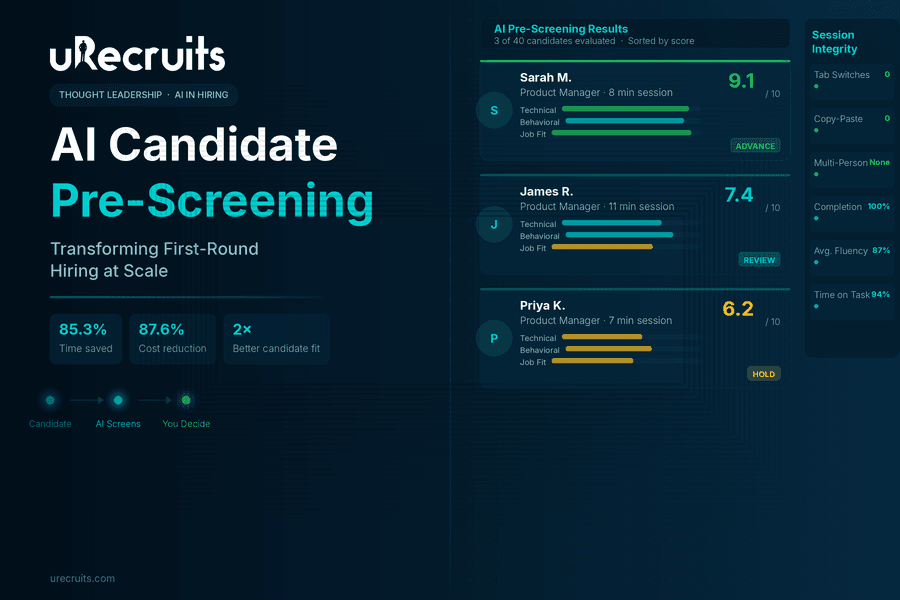
I spend my days talking to recruiters. Not about technology, but about their actual problems. The conversation almost always starts the same way. A recruiter is managing eight open roles. They have 40 applicants sitting in one position alone. Their calendar is blocked with phone screens, back to back, 20 minutes each, and by Thursday they can't remember what the Tuesday candidates actually said. By Friday, they're behind on two other roles because the screening didn't leave room for anything else. This isn't a productivity problem. It's a structural one. The phone screen is the very first human touchpoint in most hiring processes. It is also the most inconsistent, the most time-consuming, and the least documented step in the entire workflow. And it tends to be where the most correctable mistakes happen. We built AI Pre-Screening inside uRecruits to fix that structure. Not to take humans out of hiring, but to give them back the part of the job that actually requires human judgment: deciding who moves forward. The Structural Problem Nobody Talks About When I ask recruiters what frustrates them most about first-round screening, they don't complain about candidates. They complain about the setup they've inherited. Traditional candidate pre-screening relies entirely on the recruiter's capacity in the moment. A candidate who calls at 9am on a Monday gets a different version of the screen than someone who calls at 4pm on Friday. Most recruiters know their phone screens aren't fully consistent. They start with a script, then drift. The recruiter knows this, it bothers them, and they just don't have a fix. Beyond inconsistency, the documentation problem is just as real. Phone screen notes end up scattered across notebooks, email drafts, sticky notes, and personal Notion docs. The hiring manager asks about a candidate from two weeks ago and the recruiter has to dig through four places to find anything useful. The ATS has the application. The actual screen result lives somewhere else entirely. Then there's the compounding issue. According to SHRM, 48% of HR managers admit that unconscious biases affect the candidates they ultimately hire. Phone screens conducted under varied conditions, at different energy levels, with inconsistent questions are not a system designed for objectivity. They are a system that makes bias harder to avoid, not easier. The solution isn't to ask recruiters to be more disciplined. The solution is to change the structure. What Pre-Screening Candidates Actually Looks Like Today Let me be specific about what the old model costs recruiting teams. Traditional resume screening alone consumes an average of 23 hours per hire. That's before a single conversation happens. Add phone screens for a role with 40 applicants, and a recruiter can easily lose half their week to top-of-funnel evaluation before any real hiring work begins. Volume makes this worse every year. Applications have surged more than 45% year over year across major platforms. The workload of pre-screening candidates grows linearly with pipeline size, but recruiter capacity doesn't. The recruiter who sources well creates their own bottleneck. Even when notes exist after those calls, they're not structured. Comparing two candidates means reading through paragraphs of impressions formed at different times, under different conditions, in different moods. There's no fair comparison happening, just a patchwork of gut feelings documented unevenly. These aren't complaints about effort. The recruiters I work with are working hard. The structure is failing them. How AI Candidate Pre-Screening Works Inside uRecruits When a candidate reaches the AI Pre-Screening stage in uRecruits, they receive a unique invite link and complete a structured interview session covering audio, video, text, and multiple-choice questions entirely on their own schedule. The recruiter doesn't attend it. They don't schedule it. They don't take notes during it. Setting Up the Session The recruiter configures the session in advance. They choose a question preset: Balanced, Technical Heavy, Culture Fit, All MCQ, All Audio/Video, or Custom. They set category weights across Domain/Technical, Behavioral, Job-Fit, and Situational dimensions, then choose up to 40 questions and click Generate Questions with AI. The platform builds the full question set directly from the job description, job title, and required skills. The recruiter reviews the generated questions, edits anything that doesn't fit, sets the session duration and expiry window, and publishes. That's the extent of their involvement at this stage. The session goes live and the recruiter moves on to sourcing, follow-up, or hiring manager prep. Questions are generated using advanced AI models including GPT-4o, so the output is role-specific and meaningfully varied rather than pulling from a generic question bank applied to every position. What Candidates Go Through Candidates access the interview through a secure link with no login required. Before starting, there's a simple device readiness check. Once inside, an AI voice guides them through questions using natural-sounding audio, with clear on-screen instructions and timers throughout. The experience supports multiple response formats: video for behavioral and communication assessment, audio for verbal fluency evaluation, text for written clarity, and multiple-choice for objective competency checks. Candidates can complete sessions on their own schedule, which removes the coordination overhead that slows down traditional phone screens. Session integrity is monitored automatically. Tab switching gets flagged. Multiple people in frame gets detected. Copy-paste attempts are tracked. A session integrity report is generated alongside the scored results, giving recruiters full visibility into how candidates engaged throughout the process. What Shows Up in the Results Dashboard When candidates complete their sessions, every response is scored automatically. Audio answers are transcribed and evaluated. Video responses are assessed. MCQ answers are marked against correct responses. Each candidate receives a composite score out of 10, per-question AI feedback, response time data, fluency metrics for audio answers, and the full session integrity report. The recruiter opens the results dashboard and sees every candidate ranked. They click into any profile and read the full AI Summary covering what was strong, what was missing, what the candidate could improve on, and a recommendation to advance or hold. Then the recruiter decides. The platform also includes a Candidate Compare screen, so recruiters can place two or more candidates side by side for direct evaluation before finalizing the shortlist. The Part That Actually Matters: Recruiter Authority I want to be straightforward about something that comes up in nearly every customer conversation. The AI recommendation does not decide anything. It is one input, a structured, consistent, documented input, that the recruiter reviews alongside the score, the per-question breakdown, the candidate's resume, and their own judgment. The recruiter advances or rejects. Nothing happens automatically. This matters for two reasons. The first is practical. Recruiters know things the AI doesn't. They know the team dynamic. They know the manager's communication style. They know that a 7.2 from a candidate who gave thoughtful, honest answers is often more valuable than an 8.5 from someone who gave polished but shallow responses. The AI provides structured data. The recruiter brings context. The second reason is about trust. Glassdoor research found that 67% of candidates are comfortable with AI screening as long as a human makes the final decision. That's not a coincidence. It reflects something recruiting teams also feel intuitively. Tools that support judgment are more durable than tools that try to replace it. The Re-Evaluate with Custom Prompt feature in uRecruits exists specifically for this dynamic. A recruiter can take any scored session and re-score it against criteria they define themselves. That capability is not a workaround. It is the point. The recruiter is always in authority. What the Research Says About AI Pre-Screening The data behind AI in pre-screening reflects measurable outcomes that are increasingly hard to overlook. SHRM's 2025 Talent Trends report found that 43% of organizations now use AI for HR tasks, up from 26% in 2024, with recruiting being the leading use case. Nearly 9 in 10 HR professionals whose organizations use AI to support recruiting say it saves time or increases their efficiency. The World Economic Forum found that conversational AI in hiring can reduce financial costs by 87.64% compared to traditional screening methods, primarily because AI handles initial evaluations while freeing recruiters for higher-value conversations. The same WEF study also found that candidates who completed AI-led interviews succeeded in subsequent human interviews at a rate of 53.12%, compared to 28.57% from traditional resume screening groups, indicating that AI pre-screening does a better job of surfacing genuinely qualified candidates. On the recruiter side, Workable's AI in Hiring 2024 Survey found that organizations using AI in recruitment report 85.3% time savings and 77.9% cost savings compared to traditional approaches. Separately, Greenhouse's 2024 research found that 58% of recruiters say AI reduces busywork and lets them focus on candidate relationships, which is exactly what the shift looks like in practice. These aren't numbers about replacing recruiters. They're numbers about what becomes possible when AI tools for candidate pre-screening handle the repetitive first pass so that human effort can concentrate on the decisions that actually require it. What Changes in Your Weekly Schedule The teams I work with who have adopted AI Pre-Screening describe the same shift consistently. Before, their week is organized around screening calls. The calendar drives everything. Sourcing, follow-up, and hiring manager prep get whatever time is left, which often isn't much. After, screening results arrive in the pipeline. The recruiter reviews them on their own schedule, between meetings or at the start of the day when focus is high. They spend their phone time on candidates who have already demonstrated a baseline of fit. The conversations are better. The decisions are faster. The hiring manager gets a stronger shortlist with documented reasoning behind every candidate on it. The phone screen didn't disappear. It moved later in the process, to where it actually belongs. AI candidate pre-screening surfaces who is worth a real conversation, and the recruiter goes into that conversation with context already in hand rather than starting from zero. The feedback I hear from teams using AI Pre-Screening inside uRecruits isn't about the feature itself. It's about what the feature makes possible. What I Tell Every New Customer If you come to AI Pre-Screening expecting it to make hiring decisions for you, it won't. That's not a limitation. It's a deliberate design choice, and it's the right one. If you come to it expecting every candidate to receive a fair, consistent, documented first evaluation, one your whole team can see, discuss, and act on together, it will do exactly that. The recruiters I work with who get the most from this feature came in with a specific frustration: they were spending too much of their best working hours on a step that wasn't producing structured, shareable, comparable output. AI Pre-Screening fixed that for them. Everything that followed, the interviews, the offer, the hire, got better because the foundation was stronger. That's what customer success looks like to me. Not a feature being used. A problem actually being solved. Ready to See AI Pre-Screening in Action? See how uRecruits transforms your first-round evaluation with AI-driven screening that's faster, more consistent, and built around recruiter control. No credit card required. Full platform access from day one. Start Your Free 30-Day Trial | Book a Live Demo FAQs About AI Candidate Pre-Screening What is AI Pre-Screening and how does it work? AI Pre-Screening is an automated interview solution that replaces manual first-round screening with a structured, AI-driven evaluation. Candidates complete a guided interview session using video, audio, text, or multiple-choice responses on their own schedule. The AI generates role-specific questions from the job description, evaluates every response, scores each candidate, and provides the recruiter with a detailed results dashboard for review. The recruiter then makes the final decision on who advances. Does AI Pre-Screening replace recruiters or human judgment? No. The system is specifically designed to support recruiter judgment, not substitute for it. The AI recommendation is one input among several, alongside per-question scores, candidate transcripts, the resume, and the recruiter's own context. Nothing in the process advances a candidate automatically. Recruiters also have access to a Re-Evaluate with Custom Prompt feature, which lets them re-score any session against criteria they define themselves. What types of questions does AI Pre-Screening generate? Questions are generated from the job description, job title, and required skills using GPT-4o. Recruiters can choose from preset formats including Balanced, Technical Heavy, Culture Fit, All MCQ, and All Audio/Video, or configure a fully custom question set. Up to 40 questions are supported per session, with category weighting across Domain/Technical, Behavioral, Job-Fit, and Situational areas. All generated questions can be reviewed and edited before publishing. How does the system ensure fair and consistent evaluation? Every candidate in a given role is evaluated using the same questions, the same scoring criteria, and the same AI evaluation model. This removes the variability that comes from manual phone screens conducted under different conditions at different times. The session integrity system also flags tab switching, copy-paste attempts, and multiple people detected in frame, giving recruiters full visibility into how candidates engaged with the process. Can candidates complete the interview on their own time? Yes. Candidates receive a unique secure link and can complete the session at a time that works for them, within the expiry window set by the recruiter. No login is required. The interview includes a device readiness check before starting, and candidates can resume sessions if interrupted. Automatic submission occurs on completion or when the timer runs out. How does AI Pre-Screening integrate with the rest of the hiring workflow? AI Pre-Screening is a native workflow round inside uRecruits, fully integrated with Temporal for workflow automation. Interview invites are sent automatically when a candidate enters the pre-screening stage. The system tracks completion status, progresses candidates to the next stage automatically, and handles expiry and non-participation scenarios. Recruiters can also send manual invites or trigger bulk invites for high-volume roles. Where are interview recordings stored and who can access them? All interview sessions and individual candidate responses are captured and stored securely using Amazon S3. Recruiters have full playback access to recordings, transcripts, and per-question feedback from the results dashboard at any time after the session is completed. Access is limited to authorized team members within the platform. What does the results dashboard show? The dashboard shows every candidate in the session ranked by composite score. Clicking into any candidate profile shows the per-question breakdown, AI feedback on each response, audio fluency data, response time metrics, a session integrity report, and the full AI Summary with a recommendation to advance or hold. The Candidate Compare screen allows recruiters to evaluate two or more candidates side by side before making shortlisting decisions. Ready to fix your screening process? Start your free 30-day trial or book a live demo. No credit card required.
Written by
Thomas Alexander
Admin
Responsible AI in Hiring: Principles, Governance, and What Real Implementation Looks Like
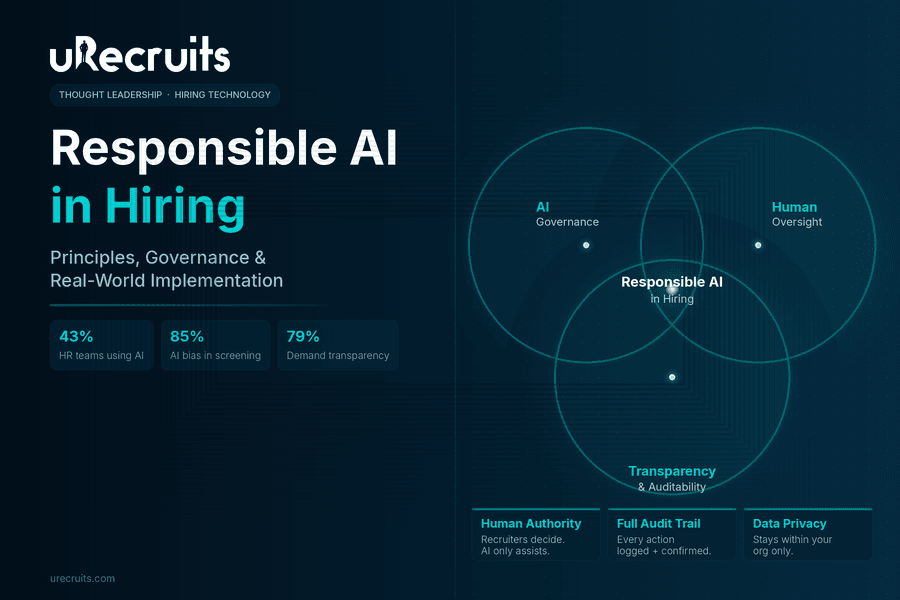
In 2024, AI-powered hiring tools processed over 30 million applications and triggered hundreds of discrimination complaints in the same period. Fast adoption without governance is not progress. It is liability. AI in hiring is no longer experimental. It is operational, regulated, and increasingly scrutinized. This guide covers what responsible AI actually means in a hiring context, what the research says about current risks, what 2026 regulations now require, and what genuine responsible AI implementation looks like at the product level. AI Adoption in HR Has Outpaced Governance SHRM's 2025 Talent Trends research found that 43% of organizations now use AI for HR tasks, up from 26% in 2024, nearly double year-over-year. SHRM's 2026 State of AI in HR report shows 92% of CHROs expect AI integration to grow further this year. Adoption alone does not mean governed adoption. HR Defense's 2025 compliance analysis documented that AI-powered hiring tools processed over 30 million applications in 2024 while triggering hundreds of discrimination complaints in the same period. Fast rollout without a governance framework is where the liability exposure comes from. What Is Responsible AI? The Working Definition for Hiring Responsible AI, sometimes referred to as responsible artificial intelligence, refers to artificial intelligence systems that are transparent in how they operate, subject to meaningful human oversight, free from unchecked bias, and accountable through reviewable records. In hiring specifically, this translates into four concrete requirements:
- AI criteria must be visible and team-defined, not hidden inside platform logic.
- Human authority over final hiring decisions must be preserved and enforced at the product level.
- Candidate data must be handled within clear privacy boundaries.
- Every AI-assisted action must be logged in a way that can be reviewed later.
Written by
Thomas Alexander
Admin
10 Types of Candidate Assessments for Smarter Candidate Screening
It's not enough to just match applicants to job descriptions these days; you also have to find potential. It's not just about finding someone who can do the job; it's also about finding someone who will do well at it. That's where candidate assessments come in. In a world full of job applications, gut feelings aren't enough. You can't trust your gut feelings or well-prepared interviews to help you hire someone for a million dollars anymore. Resumes show what someone says they know. Interview assessment tools show you how a person acts. But only candidate assessments show how well someone really does their job. If recruiting is like putting together a puzzle, candidate assessments are like the light that helps you see the edges clearly. These talent assessments turn guessing into knowledge, bias into fairness, and hiring into an art form based on data. Candidate assessments not meant to replace human judgment; they're meant to improve it by giving recruiters a better idea of a candidate's abilities, potential, and fit. What Are Candidate Assessments? A candidate assessment is a way to test job candidates on the abilities, attributes, and behaviors that are important for the job before making a hiring decision. Written tests, employment simulations, cognitive exercises, behavioral evaluations, and situational judgment scenarios are all examples of them. The goal is clear: To guess how well someone will do at work before hiring them. Candidate assessments are a fair and consistent technique to judge all candidates on the same scale, rather than only looking at resumes and interviews. When done well, testing and evaluating candidates not only make recruiting more accurate, but they also make the whole process better for candidates. Why Smart Screening Needs Smarter Assessments? Let’s face it: modern hiring is overwhelming. Recruiters have to look through hundreds of applicants for each job, work with short deadlines, and feel the need to discover the perfect fit immediately. A lot of the time, traditional screening methods get rid of prospects too soon because they just look at things like keywords or GPA. That means that a lot of outstanding talent, diverse, imaginative, and out-of-the-box talent, gets missed. Smarter candidate screening, powered by assessment methods for hiring, changes this. It shifts the focus from elimination to evaluation. From “Who doesn’t fit?” to “Who fits best?” Candidate assessment let recruiters go past the obvious and measure things like flexibility, learning speed, problem-solving, and emotional intelligence. That's the secret to hiring not just decent workers, but outstanding ones. From Gut Feeling to Data Feeling For a long time, candidate selection was mostly based on the gut feeling of the manager. Managers chose candidates based on how well they got along, how charming they were, or how much they shared hobbies. But gut feelings, as human as they are, frequently have a bias. Recruiting these days needs something more organized, and that's where candidate assessment methods for recruitment come in. They make things more consistent. The identical job assessment test is given to all applicants and graded in the same manner. This makes things fair, gets rid of bias, and provides everyone an equal chance to do well. And the best part? Data and empathy are now working together. Recruiters can recognize both the quantifiable and the human sides of a person's potential. The Human Side of Candidate Assessments Let's get rid of a myth: tests don't turn applicants into numbers. The goal is to get to know them better. A good way to test candidates allows introverts, those who want to change careers, and quiet achievers a chance to show what they can do without having to "sell themselves" in an interview. It allows everyone, no matter where they come from, the same chance to show off their skills, inventiveness, and attitude. To sum up: Candidate assessments make hiring more human, not less. How Candidate Assessments Transform the Hiring Journey Here's how candidate assessment change the hiring game: Old Hiring Model
- Relies on resumes & impressions
- Subjective judgments
- Bias and inconsistency
- Guesswork
- Focus on experience
- Relies on performance data & skills
- Standardized evaluation
- Fairness and transparency
- Predictive insights
- Focus on potential
- Skills indicate what someone can do.
- Cognitive exams indicate how they think.
- Personality and cultural tests tell you who they are.
- Tests of behavior and situations demonstrate how they will perform.
- Relying completely on candidate assessments. Tests can give you useful information about candidates, but they shouldn't be the only thing you think about when making hiring decisions. The combination of candidate assessments results, interviews, references, and recruiter judgment ensures a more comprehensive evaluation of the candidate.
- Overloading candidates with tests. Requiring excessive or redundant assessments could lead to applicant fatigue and deter top talent from finishing the application process. Only use the candidate assessment that are most important for the job, and keep them short.
- Failing to customize candidate assessments to the role. Generic tests may not effectively assess the abilities and attributes required for specific vocations. Tailoring evaluations to the task ensures that they give significant insights while also satisfying the needs of the company.
- Ignoring cultural and organizational fit. Skills and knowledge are crucial, but ignoring cultural alignment can result in poor retention and team conflict. Include evaluations on values, people skills, and how well the person fits in with the company culture.
- Ignoring inclusion in talent assessment design. Assessments that lack accessibility features or contain prejudiced language may mistakenly reject or penalize specific candidates. Ensure that your candidate assessments are fair, inclusive, and in compliance with diversity and equality rules.
- Concentrating only on hard talents. Technical abilities are important, but so are soft skills like being able to talk to people, being flexible, and having emotional intelligence. Balance your assessments to evaluate both.
- Misinterpreting or overvaluing outcomes. Candidate assessment scores provide a snapshot, but they do not account for a candidate's potential for progress. Avoid rejecting promising candidates merely based on severe scoring criteria.
- If tests are seen as a separate activity, their results could be different from those of interviews or other ways of judging. Make sure that talent assessment results inform the entire hiring process.
- Providing ineffective candidate communication. Candidates should know what to expect, why they are being tested, and how the results will be used. Lack of transparency can induce annoyance and disengagement.

Written by
Brad McGeown
Admin
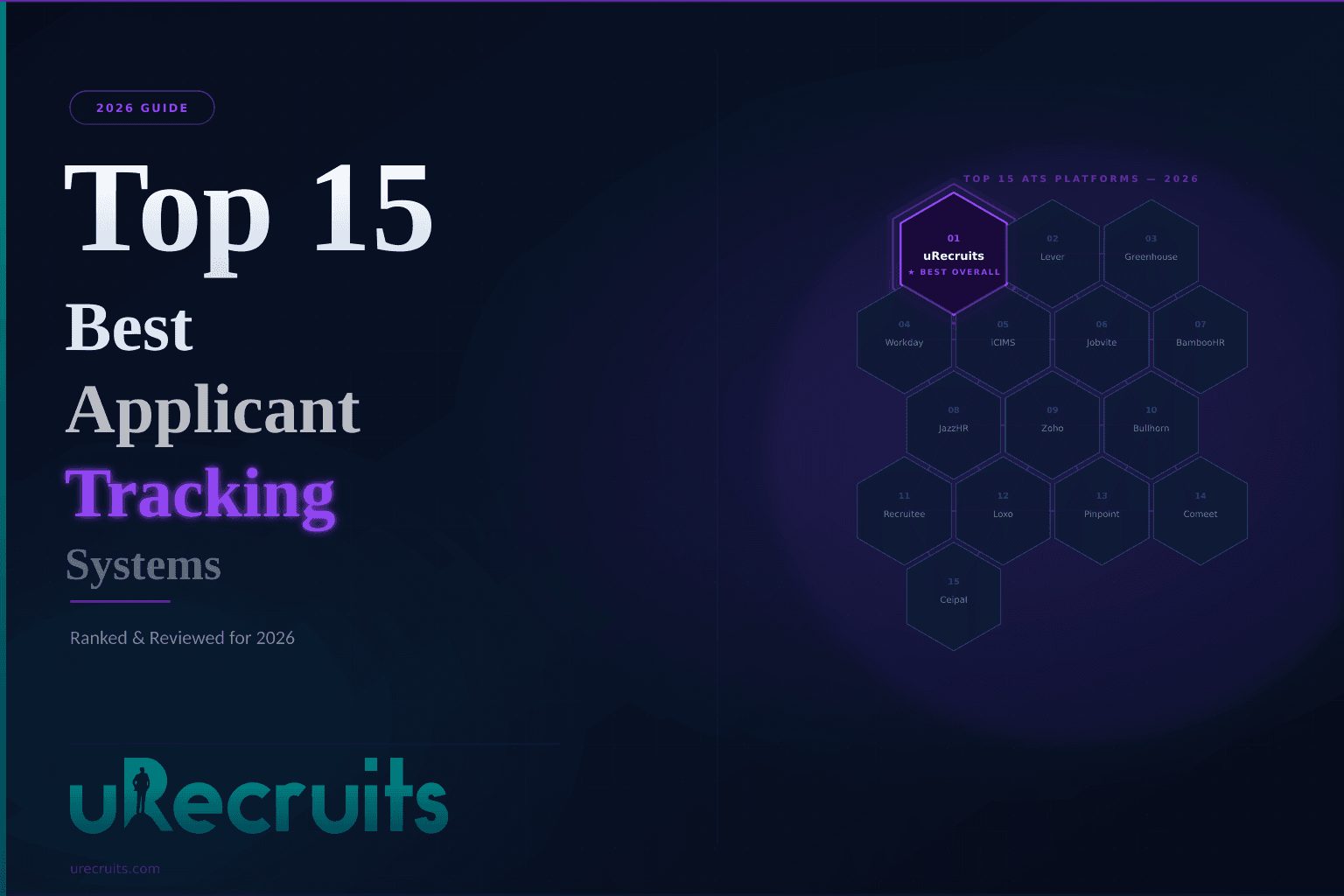
Top 15 Best Applicant Tracking Systems for 2026
Hiring in 2026 does not reward slow teams. A strong candidate who applied on Monday has three interviews scheduled by Wednesday and an offer in hand by Friday. If your process is still running on spreadsheets, email threads, and calendar ping-pong, you are not just losing time. You are losing people. That is exactly why top applicant tracking software has become a non-negotiable part of modern recruiting. 94% of recruiters report their ATS has improved their hiring process, and ATS adoption now sits at 93% among recruiting professionals. Nearly 99% of Fortune 500 companies already run one. Small and mid-sized teams are catching up fast because they have seen what happens when competitors with better recruitment software start winning candidates they used to hire. The challenge is that not all ATS systems are built the same way. Some are lightweight tools for teams with five open roles. Others are enterprise platforms that take months to configure. A smaller group genuinely brings everything together: sourcing, screening, assessment, scheduling, compliance, and analytics in one place that your team will actually use every day. This guide walks through the 15 best applicant tracking systems for 2026, what each one does well, what to watch for, and how to pick the right fit for where your organization is going next. What Is an Applicant Tracking System Application tracking system software is a recruitment platform that manages hiring from the moment a job goes live to the moment an offer gets accepted. It stores and organizes candidate data, automates time-consuming steps like resume review and interview scheduling, and keeps every member of your hiring team working from the same information at the same time. Good ATS systems go well beyond a resume database. The best ones help you write and distribute job postings across dozens of boards simultaneously, parse incoming applications automatically, run structured skills-based evaluations, manage background verification, and surface real-time analytics so you always know where your pipeline stands. When talent acquisition systems are working properly, your recruiters spend their time on conversations and decisions, not on administrative coordination that a workflow could handle. These platforms are used across every company size and industry. Startups build structured hiring from their very first role. Enterprise talent acquisition systems manage hundreds of simultaneous openings across departments and global locations. Staffing agencies run high-volume placements across multiple clients without the chaos. The common thread is the same need: one system where jobs, candidates, feedback, and decisions all live together. Why Recruitment Software Matters More Than Ever Every Open Role Has a Real Price Tag Leaving a role unfilled is not just inconvenient. It is expensive. Your existing team absorbs the extra workload. Projects slow down. Revenue-generating positions sit empty while your hiring process runs at the pace of manual follow-up. ATS recruiting software compresses those timelines by taking repetitive, rule-based work off your plate: job posting, resume sorting, scheduling logistics, status updates. Your team focuses on the work that actually requires human judgment. The Application Experience Decides Who Even Applies 92% of job seekers abandon applications on platforms that feel complicated or slow. A desktop-only form that takes 15 minutes to complete is not a small inconvenience. It is a filter that removes qualified candidates before you ever see their name. Mobile-optimized career pages and clean application flows are now baseline expectations, not competitive advantages. Disconnected Teams Make Bad Hiring Decisions When feedback lives in three different places and hiring decisions happen in informal Slack conversations, the handoffs break down. One interviewer thinks a candidate moved forward. Another is waiting on feedback that was never formally submitted. The candidate follows up and hears nothing. Good ATS for recruiters creates a shared record where every piece of candidate information is visible to the right people in real time, so decisions get made faster and with better information behind them. TL;DR: Quick Summary of the Best Applicant Tracking Systems for 2026 If you are comparing popular applicant tracking systems, looking for the most popular ATS software for your team, or deciding between ATS platforms for your next stage of growth, here are the 15 systems most hiring teams evaluate.
- uRecruits: Best Applicant Tracking System Overall, unified platform with AI-assisted automation, built-in assessments, and 22,000+ board distribution
- Lever: ATS plus CRM for mid-sized organizations focused on candidate relationships
- Greenhouse: Structured hiring with strong compliance tools for scaling teams
- Workday Recruiting: Enterprise HCM recruiting module for companies already on Workday
- iCIMS: Highly configurable talent acquisition system for enterprise hiring
- Jobvite: All-in-one ATS and CRM for large organizations with complex needs
- BambooHR: Unified HRIS with recruiting for mid-sized businesses
- JazzHR: Budget-friendly ATS for small businesses starting at $75 per month
- Zoho Recruit: Affordable and configurable ATS for smaller organizations
- Bullhorn: ATS and CRM purpose-built for staffing agencies
- Recruitee: Team-focused ATS for collaborative hiring workflows
- Loxo: AI-assisted sourcing and talent intelligence for staffing operations
- Pinpoint: Modern ATS with employer branding focus for in-house teams
- Comeet: Collaborative ATS for small to mid-sized organizations
- Ceipal: AI-assisted ATS with credential verification for tech-forward teams
Written by
Brad McGeown
Admin
25 Best Job Boards For Recruiters 2026
Finding the right job, or the right candidate, is no longer about visiting an office with a paper résumé. In today’s digital-first hiring world, job boards are where opportunities meet ambition. But here’s the catch: all job boards are not created equally. Some attract millions of monthly visitors. Others cater to specialized industries, and a few stand out with smart AI-powered matching. This saves recruiters and job seekers hours of effort. If you’re a recruiter, posting on the wrong platform can result in wasted budgets and irrelevant applications. If you’re a job seeker, applying in the wrong place can bury your résumé under hundreds of others. That’s why it is essential to know the top US job boards with proven reach, credibility, and unique benefits. Let’s curate a list of the most popular job boards in the U.S. It covers general job sites, niche platforms, and tech-driven boards. As a result, you can focus on the ones that truly deliver results. TL;DR: Quick Summary of Best Job Boards For Recruiters in 2026 If you are searching for the best job boards for recruiters, a complete list of job boards, or the top job sites for recruiters in the US, these are the 25 platforms most hiring teams compare in 2026.
- uRecruits: Best Job Board For Recruiters, complete recruiting ecosystem with AI-assisted sourcing, ATS, and multi-board distribution in one dashboard
- Indeed: Largest reach across industries with 250M+ monthly visitors
- Google for Jobs: Free visibility through Google Search for maximum reach
- LinkedIn: Best job board for hiring professional, senior, and executive-level talent
- ZipRecruiter: AI-driven matching with distribution across 100+ job sites for recruiters
- Monster: Long-standing platform with resume database and employer branding
- CareerBuilder: Data-backed hiring with AI candidate matching and labor insights
- USAJOBS.gov: Official portal for all US federal government job postings
- CareerArc: Best for employer branding combined with job distribution
- Snagajob: Best job board for high-volume hourly and part-time hiring
- Glassdoor: Trusted job board with company reviews and salary transparency
- Careerjet: Global job search aggregator with multi-language support
- Dice: Go-to job board for IT, engineering, and developer roles
- FlexJobs: Specialized platform for remote, hybrid, and flexible work
- Idealist: Dedicated to nonprofit, NGO, and mission-driven hiring
- SimplyHired: Affordable wide-reach aggregator with free job postings
- Craigslist: Best for hyper-local and budget-friendly hiring
- LinkUp: Spam-free listings sourced directly from employer websites
- Robert Half: Recruiter-driven placements for finance, legal, and tech roles
- Behance: Best job board for hiring designers and creative professionals
- Dribbble: Specialized in UI/UX and product design talent
- Wellfound (AngelList): Best for startup hiring and equity-based roles
- Facebook Jobs: Hyper-local targeting for hourly and small business hiring
- Handshake: Best for internships, graduate hiring, and early-career talent
- Upwork: Top freelancing marketplace for remote and project-based work
- AI-powered candidate sourcing
- Resume parsing
- ATS functionality
It is suitable for the fast-growing user base in the U.S. Fits well with strong adoption among mid-size and enterprise companies. Posting Benefits:
AI resume analysis, candidate scoring, automated interview scheduling, and role-based access controls. Why It Stands Out:
uRecruits isn’t just a job board. But, it’s a complete recruiting ecosystem. It provides recruiters with both visibility and efficiency. Further, it ensures job seekers find tailored opportunities. If other platforms focus only on visibility, uRecruits focuses on speed, quality, and efficiency. It helps recruiters hire faster and smarter. 2. Indeed It is one of the largest job boards in the world. Indeed attracts 250M+ monthly visitors. It remains a staple for both recruiters and job seekers. The reason is its free job postings and sponsored ads. Audience Reach:
It has the broadest reach across industries and experience levels. Posting Benefits:
You get benefits for free job listings, sponsored options for visibility, and resume database access. Why It Stands Out:
It helps recruiters in high-volume hiring](https://urecruits.com/blog/what-is-high-volume-recruiting) and job seekers in searching for diverse opportunities. 3. Google for Jobs Google for Jobs isn’t a standalone board. However, it’s a job aggregator that pulls listings from across job boards and career sites. It increases reach by showing jobs directly in Google Search results. Audience Reach:
Anyone searching via Google (massive visibility). Posting Benefits:
It provides free visibility through structured data integration. Why You Should Choose It?
You get an unmatched reach via Google Search. 4. LinkedIn It is more than just a job board. LinkedIn combines professional networking with hiring tools. There are over 200M US-based profiles that makes it a go-to option for sourcing both active and passive candidates. Audience Reach:
You get to know about the highly professional audience with verified profiles. Posting Benefits:
You get benefits for employer branding, candidate outreach, and advanced targeting. Why It Stands Out:
It is an ideal option for specialized, senior, or executive-level hires. 5. ZipRecruiter It has a “one post, multiple boards” system. ZipRecruiter distributes job ads across 100+ sites. Its AI-driven matching recommends candidates to recruiters and jobs to seekers. Audience Reach:
There are 25M+ active job seekers per month. Posting Benefits:
There is an AI-powered matching, wide distribution, and recruiter dashboard. Why It Stands Out:
It is great for recruiters who need fast applicant flow. 6. Monster It is known as the king of online recruiting. Monster still serves millions of job seekers. It offers posting packages, resume searches, and employer branding tools. Audience Reach:
There are millions of monthly users across industries. Posting Benefits:
Resume database, employer branding, integrations with ATS systems. Why It Stands Out:
It is a long-standing, reliable job platform that has a broad reach. 7. CareerBuilder CareerBuilder has evolved into a data-backed hiring platform. It provides candidates with sourcing and analytics in addition to job postings. Audience Reach:
There is a large US-based audience with diverse industries. Posting Benefits:
You get benefits of AI candidate matching, labor market insights, and mobile-friendly experience. Why It Stands Out:
It is actually great for recruiters who want data-driven insights alongside job postings. 8. USAJOBS.gov If your focus is federal government jobs, USAJOBS.gov is the official portal. It is managed by the U.S. Office of Personnel Management. And, it connects candidates directly with public sector roles across agencies. Audience Reach:
Federal job seekers and professionals exploring government careers. Posting Benefits:
Direct access to millions of applicants interested in civil service. Why It Stands Out:
It’s the primary gateway to U.S. government employment. 9. CareerArc.com CareerArc mixes job posting with employer branding and outplacement services. It’s widely used by companies that want to improve visibility and maintain reputation. Audience Reach:
Mid-to-large employers looking for both hiring and layoff support. Posting Benefits:
Social recruiting, outplacement programs, branded job ads. Why It Stands Out:
It is great for organizations prioritizing employer brand in hiring. 10. Snagajob Snagajob specializes in hourly and part-time work. It has over 100M registered workers. The numbers make it ideal for employers in -
- retail,
- hospitality,
- healthcare, and
- gig industries.
Hourly job seekers, part-time workers, seasonal hires. Posting Benefits:
Mobile-friendly listings, candidate shift scheduling, instant alerts. Why It Stands Out:
It’s the best platform for high-volume hourly hiring. 11. Glassdoor Glassdoor is known for its company reviews and salary insights. However, it also doubles as a trusted job board. Recruiters use it to attract candidates who value transparency. Further, the job seekers use it to apply smartly. Audience Reach:
There are millions of monthly visitors who are focused on career growth. Posting Benefits:
The platform works well for the branded job ads, company review management, and salary insights. Why It Stands Out:
It helps job seekers align with companies where culture and pay match their expectations. 12. Careerjet.com Careerjet operates as a job search engine. It aggregates listings from thousands of company sites and job boards. Audience Reach:
Global job seekers across different industries. Posting Benefits:
Cost-effective listings and wide distribution through aggregation. Why It Stands Out:
One of the most globally recognized aggregators with multi-language support. 13. Dice Dice is the go-to job site for tech hiring. It specializes in -
- IT,
- engineering, and
- developer jobs.
Tech professionals, IT, and software developers. Posting Benefits:
Tech-focused resume database, targeted ads, AI matching. Why It Stands Out:
Dice is the best job board for IT and technology roles. 14. FlexJobs FlexJobs caters to -
- remote,
- hybrid, and
- flexible work opportunities.
Remote job seekers, freelancers, and part-time professionals. Posting Benefits:
You get benefits of curated remote job postings, scam-free guarantee, subscription model. Why It Stands Out:
FlexJobs Specializes in remote and flexible work hiring. 15. Idealist The job site is tailored for -
- nonprofits,
- NGOs, and
- mission-driven organizations.
Nonprofit professionals, volunteers, and mission-driven candidates. Posting Benefits:
Idealist is beneficial for listings for jobs, internships, and volunteer opportunities. Why It Stands Out:
It is dedicated to social impact and nonprofit hiring. 16. SimplyHired SimplyHired is a job search engine. It aggregates listings from across the web. And, it’s also known for salary estimates and job description tools. Audience Reach:
Broad job seekers across industries. Posting Benefits:
It provides free job postings, pay-per-contact for resumes. Why It Stands Out:
Affordable, wide-reach aggregator. 17. Craigslist It’s not a traditional job board. However, Craigslist remains a popular low-cost option for local hiring. Especially for small businesses. Audience Reach:
- Local candidates,
- blue-collar workers, and
- gig workers.
You get benefits of city-based job postings and low listing fees. Why It Stands Out:
Best for hyper-local, budget hiring. 18. LinkUp LinkUp indexes only jobs posted directly on employer websites. It ensures accuracy and reduces spam. Audience Reach:
Professionals who want verified, up-to-date listings. Posting Benefits:
You get job data insights, direct-from-employer feeds. Why It Stands Out:
Spam-free, real-time listings. 19. Robert Half Robert Half is a staffing firm. It also runs a job board, making it unique. The reason being candidates can get recruiter guidance alongside postings. Audience Reach:
Professionals in finance, accounting, legal, admin, and tech. Posting Benefits:
It provides recruiter support, temp + full-time placements. Why It Stands Out:
Recruiter-driven job placements. 20. Behance Behance is owned by Adobe. It is a creative portfolio platform where professionals showcase design work and connect with employers. Audience Reach:
Designers, illustrators, and creative professionals. Posting Benefits:
Access to creative portfolios and talent discovery. Why It Stands Out:
It is best for hiring creative professionals. 21. Dribbble Dribbble is another creative hub, primarily for UI/UX designers, product designers, and digital artists. Audience Reach:
Freelancers and full-time designers in digital fields. Posting Benefits:
Job board + talent search + freelance hiring. Why It Stands Out:
It specializes in UI/UX and product design talent. 22. AngelList (now Known As Wellfound) AngelList was recently rebranded as Wellfound. It is the go-to hub for startups hiring across roles. It connects early-stage companies with candidates looking for equity-driven opportunities. Audience Reach:
It is suitable for startup talent, from developers to marketers. Posting Benefits:
There are direct startup connections, equity/job transparency. What Makes it A Top Choice?
It is best for startup hiring and equity-based roles. 23. Facebook Jobs Facebook Jobs carries the power of the world’s largest social network to connect employers with job seekers. Its strength lies in precise audience targeting and organic reach through social sharing. Audience Reach:
It is suitable for local job seekers, hourly workers, small business talent. Posting Benefits:
You get free job listings with optional boosted ads. Why Should You Choose?
There is a huge reach with hyper-local targeting for quick hires. 24. Handshake Handshake is a leading career platform. It focuses more on students and recent graduates. It partners with universities to give employers access to a -
- young,
- motivated, and
- early-career talent pool.
It works great for college students, recent graduates, entry-level talent. Posting Benefits:
Campus recruiting tools, career fair/event integration. Why It Stands Out:
It is best for internships, graduate hiring, and building future pipelines. 25. Upwork Inc. Upwork is the world’s top freelancing marketplace. It connects businesses with independent professionals globally. It offers flexibility for -
- short-term,
- long-term, and
- project-based work.
Freelancers and businesses worldwide. Posting Benefits:
Easy project posting, secure contracts, global talent pool. Why It Stands Out:
It is best for remote work and on-demand freelance hiring. Tips for Recruiters & Job Seekers Job boards are often seen as one-sided, either -
- recruiter-centric (helping companies post jobs) or
- candidate-centric (helping job seekers apply).
- Posting jobs across multiple sites
- Sorting through hundreds of irrelevant résumés
- Struggling to keep candidates engaged
Instead of manually screening, uRecruits automatically extracts:
- Skills
- Experience, and
- Education from applicants
With one click, jobs posted on uRecruits can also be shared on:
- Major job boards
- Social media, and
- Internal databases
Recruiters can set up:
- Personalized email updates
- Rejection letters, and
- Interview scheduling
Detailed reports show which job postings and channels deliver the most qualified candidates. So, the budgets go further. Recruiters who consistently use uRecruits’ talent pool and analytics tools reduce time-to-hire by up to 40% compared to those relying only on traditional job boards. For Job Seekers: How to Stand Out on uRecruits Job boards are crowded. However, uRecruits is designed to give candidates visibility beyond a simple résumé upload. 1. AI-Powered Profile Matching
uRecruits recommends jobs where your skills align, reducing wasted effort. You don’t have to apply endlessly. 2. One-Click Apply
Candidates can use a unified profile to apply across multiple opportunities. It cuts application time dramatically. 3. Skill-Based Highlighting
On traditional job boards résumés can get buried. uRecruits shows profiles to recruiters searching for specific skills. It makes candidates more discoverable. 4. Stay in the Loop
Automated updates means you know exactly where you stand. So, you don’t have to think if your résumé disappeared into a black hole. 5. Build Long-Term Career Value
Recruiters can add you to their private databases for future opportunities. It happens even if you don’t get hired immediately. Final Thoughts Finding the right job board in today’s crowded digital space can feel overwhelming. But the truth is, not all platforms are created equal. Some traditional job boards like Indeed, LinkedIn, and ZipRecruiter have a better reach. However, uRecruits goes beyond job postings. It creates a smart ecosystem where recruiters save time with automation and AI. Further, the job seekers gain visibility and personalized opportunities that actually match their skills. If you’re a recruiter, you get -
- shorter hiring cycles,
- better quality hires, and
- stronger candidate relationships.
- less guesswork,
- more transparency, and
- real career growth opportunities.
Written by
Thomas Alexander
Admin
Top 7 Applicant Tracking System for Manufacturing in 2026
Production schedules do not wait for slow hiring processes. When you need 20 welders by Monday or a major order falls behind, traditional recruiting methods cost you real money. Manual resume screening takes days. Email chains for interview scheduling drag on for weeks. Missing safety certifications create compliance risks that put operations at risk. Manufacturing recruitment software changes that equation completely. The right applicant tracking system for manufacturing cuts time-to-fill dramatically, verifies credentials automatically, and handles seasonal hiring surges without breaking down. Manufacturing faces the longest hiring timelines across all industries. SHRM reports it takes an average of 70 days to find and recruit skilled production workers. Meanwhile, 82% of manufacturers report moderate or serious shortages in skilled production workers. The sector cannot afford to waste time on outdated hiring processes when skilled workers are this scarce. This guide evaluates the best manufacturing applicant tracking systems available in 2026, comparing features that matter most for factory hiring. TL;DR: Quick Summary of Top Recruiting Software For Manufacturing If you are searching for the best applicant tracking system for manufacturing or the top recruiting software for manufacturing teams, these are the 7 platforms most factory hiring teams compare.
- uRecruits: Top Recruiting Software for Manufacturing, best ATS for fast, high-volume hiring without compliance gaps
- Greenhouse: Structured hiring for large manufacturing organizations with multi-plant operations
- Workday Recruiting: Enterprise HCM with recruiting built in for manufacturers already on Workday
- iCIMS: Highly configurable ATS for complex union and compliance workflows
- Lever: ATS plus CRM for sourcing-heavy skilled trades recruitment
- BambooHR: Unified HRIS with basic recruiting for smaller manufacturers
- JazzHR: Budget-friendly option for small manufacturers getting organized
Written by
Brad McGeown
Admin
Top 5 Applicant Tracking System for Education in 2026
The education staffing crisis has reached critical levels across the United States. According to the Learning Policy Institute, approximately 1 in 8 teaching positions nationally are either unfilled or filled by teachers not fully certified for their assignments. That translates to over 411,000 positions affecting more than 6 million students. The numbers get worse when you examine retention. Teacher attrition costs the United States between $2.2 billion and $4.9 billion annually, with individual schools spending anywhere from $10,000 to $18,300 to replace each departing teacher. High-poverty schools face turnover rates around 20% per year, roughly 50% higher than more affluent institutions. Nearly three out of four schools struggle to hire qualified educators, with special education, STEM, and foreign language positions among the hardest to fill. For HR teams and school administrators, this creates a perfect storm: chronic vacancies, intense competition for certified teachers, and compressed hiring timelines dictated by academic calendars. An applicant tracking system for education has become essential survival infrastructure. The right education recruitment software cuts hiring time by 30%, automates teaching credential verification, and helps you build talent pipelines before positions even open. This guide will help you find the best applicant tracking system for education for your school, college, or university. What is an Applicant Tracking System for Education? An applicant tracking system for education is recruitment software that manages hiring for schools, colleges, and universities from job posting through onboarding. Unlike generic platforms, education recruiting software includes purpose-built features for academic hiring: teaching license tracking, subject endorsement verification, credential expiration monitoring, and compliance with state education regulations. These systems centralize everything in one platform. HR teams post openings, screen applications, verify credentials, coordinate interviews, communicate with candidates, and document hiring decisions all from a single dashboard. Recruiters, principals, department chairs, and compliance officers access the same candidate information simultaneously without email chains or spreadsheet confusion. For institutions managing multiple openings across departments, grade levels, and campuses, an applicant tracking system for school and higher education becomes the operational backbone. The platform identifies qualified applicants, flags missing certifications, tracks candidates through evaluation stages, and maintains audit-ready documentation. What Does Education Recruitment Software Actually Do? Modern recruitment software for education handles far more than resume collection. Here's what quality platforms deliver. Distributing Job Posts Across Multiple Channels Your education recruiting software publishes openings to multiple job boards simultaneously. Free platforms like Google For Jobs and premium job boards like JobTarget, along with LinkedIn, Indeed, and your branded career site all update at once instead of requiring manual posting to each platform individually. Quality systems include templates for teaching positions, so you start with proper structure for certification requirements, subject endorsements, and grade level experience rather than building descriptions from scratch every time. Screening Applications for Teaching Qualifications Resume parsing scans incoming applications for what matters in education: state teaching licenses, subject endorsements like ESL or special education, years of classroom experience, grade level expertise, advanced degrees, and specialty certifications. The system ranks candidates by how well they match your requirements. This means reviewing your top qualified candidates first instead of manually reading through hundreds of applications hoping to spot someone with proper certifications. Your team talks to promising educators instead of drowning in administrative screening. Managing Candidates Through Hiring Stages Custom workflows accommodate different position types. Classroom teachers might move through phone screening, demo lessons, panel interview, and credential verification. Tenure-track faculty positions include multiple rounds, research presentations, teaching demonstrations, and committee evaluations. The platform advances candidates between stages, sends updates automatically, and prevents gaps where someone forgets to schedule the next interview or order background checks. Automating Teaching Credential Verification This separates education-specific platforms from generic systems. Verifying teaching licenses manually means calling state boards, tracking certifications, checking expiration dates, and documenting everything. Quality applicant tracking systems for higher education and K-12 connect to state licensing databases and background check providers. When candidates reach specific workflow stages, the system initiates verification automatically. Results come back documented and audit-ready, cutting verification time significantly. Keeping Educators Engaged Throughout Your Process Qualified teachers have options. Two weeks of silence means they've likely accepted another offer. Your teacher recruitment software maintains communication automatically: application confirmations, status updates, interview reminders, and next-step notifications. Consistent contact keeps candidates interested while you complete evaluations. It also signals professionalism and organization, which matters when competing for top teaching talent. Coordinating Interview Schedules Efficiently Coordinating calendars across candidates, panel members, principals, and department chairs typically requires dozens of emails. Higher education recruitment software connects to calendars, displays availability, and lets candidates select times that work. Automated reminders reduce no-shows and last-minute rescheduling. This feature alone can eliminate days or weeks from hiring timelines when you're racing to fill positions before term starts. Tracking What Works and What Doesn't Effective platforms track everything: days to fill by subject area, which job boards deliver qualified applicants, where candidates abandon your process, cost per hire, and diversity metrics. When data shows your best special education teachers come from a specific board, you invest more there. When candidates drop out during lengthy applications, you know where to simplify. Top 5 Applicant Tracking Systems for Education in the USA We evaluated education recruiting software based on US market fit, compliance capabilities, and proven results in academic hiring. These five platforms stand out. 1. uRecruits: Best Overall Applicant Tracking System for Education uRecruits leads as the most effective applicant tracking system for education for US schools, colleges, and universities seeking measurable hiring improvements. Built specifically for academic recruiting challenges, uRecruits delivers results that transform how institutions fill classrooms and departments. Schools and universities using uRecruits achieve 30% faster hiring cycles, dramatically reduced credential verification time, and improved teacher retention through better matching. These outcomes stem from workflows designed exclusively for education, combining automation, AI capabilities, and candidate experience that attracts quality teaching talent. Comprehensive Education Recruitment Features
AI Job Postings for Every Academic Role
Generate accurate postings for classroom teachers, faculty members, research positions, administrative staff, counselors, librarians, facilities personnel, and support roles in under a minute. From hourly teaching staff and guest lecturers to tenured faculty and research posts, the applicant tracking system for education handles the complexity of multiple hiring workflows. The system understands educational requirements, certification needs, and subject-specific qualifications. Post to uRecruits job marketplace, free job boards like Google For Jobs, and premium boards like JobTarget to reach qualified applicants quickly.Career Pages and Mobile Experience
Give candidates a real sense of your institution before they apply. Educators can explore positions on your dedicated career page by subject area, grade level, campus location, and required certifications. Highlight your professional development programs, benefits, and culture to attract educators who fit your mission. Candidates apply from their phones, upload credentials, and track status from any device.Resume Parsing for Teaching Credentials and Subject Expertise
Sorting through hundreds of teaching applications to find who has the right certifications and subject expertise is exhausting. The education recruitment software reads every resume, extracts teaching licenses, subject endorsements, grade level experience, degrees, and state certifications. Smart resume parsing understands subject certifications, grade-level experience, endorsements, degrees, and board or state licensing. You get prioritized lists of qualified educators instead of spending hours reviewing documents manually.Integrated Credential and Background Verification
Build hiring workflows that trigger credential verification and background checks at the right stages. Our applicant tracking system for education integrates with Universal Background Screening to conduct pre-employment criminal background checks, employment and education credential verification, and drug testing. Results come back documented per candidate so every hire can be reviewed against your requirements before their start date. Additional verification providers can be integrated based on your needs.Skills Assessments and Collaborative Hiring
Design assessments for subject knowledge, classroom management, or leadership potential with Functional and Domain Assessments for content expertise, Live Task Assessments for real-time evaluation, or Take Home Assessments for independent skill verification. Want to evaluate content expertise or instructional strategies before scheduling interviews? Create assessments specific to your needs. Share candidate evaluations and interview notes securely with your hiring committee inside the applicant tracking system for education. Keep hiring teams aligned with shared scorecards, structured feedback, and evaluation tools. All assessments and notes are documented for HR compliance.Structured Hiring Processes Across Departments and Campuses
View every teaching candidate on one screen and manage them through customizable position workflows including HR video interviews for initial screening, domain assessments for subject expertise, skills verification, background screening, and credential verification. Create separate workflows for different schools, colleges, departments, subject areas, or campuses. Generate conditional offer letters from templates with all legal language included. Move candidates with drag-and-drop and track real-time status at every stage.Centralized Analytics and Workforce Planning
Track hiring performance across departments and campuses with institution-wide analytics. See where your process slows down, monitor fill rates, and use data to plan ahead before shortages become bigger problems. uRecruits gives HR the visibility to make better workforce decisions without pulling reports from multiple systems.Integrations That Fit Your Workflow
Connect with Outlook Email for candidate communication, Google Calendar and Outlook Calendar for interview scheduling, and Universal Background Screening for credential and background verification. Additional integrations are available based on your institution's requirements. Why uRecruits Stands Out uRecruits was built for education recruiting by people who understand academic hiring cycles, credential complexity, and compliance requirements. Implementation takes 2-3 weeks instead of months. Pricing works for small schools through large university systems. The platform helps you attract qualified certified educators, evaluate them efficiently, and hire them before competing institutions. 2. Greenhouse: Enterprise ATS Used by Universities Greenhouse is a well-known enterprise applicant tracking system used by some universities and colleges for faculty and staff hiring. Strengths Strong structured interview tools with customizable scorecards help standardize candidate evaluation. Over 450 integrations connect with background checks, skills testing, video interviews, and onboarding tools. The platform supports complex organizational structures well, making it suitable for large universities with multiple colleges and departments. Advanced analytics and reporting provide hiring insights. The candidate experience is clean and modern with full resume visibility beyond parsed data. Limitations Greenhouse is not education-specific, which means it lacks built-in features for teaching license verification, subject endorsement tracking, or academic credential workflows. You'll need to configure workflows manually or rely on third-party integrations for education compliance. The platform is expensive, especially for mid-sized institutions. Implementation can take several months and requires dedicated resources. AI features support recruiters but don't make hiring decisions or score candidates automatically. Best For: Large universities running corporate-style talent operations with dedicated recruitment and IT teams who need maximum flexibility and have enterprise budgets. 3. iCIMS: Enterprise Platform with Education Clients iCIMS is a comprehensive enterprise recruiting platform used by some large schools and universities across the United States. Strengths Powerful talent pool functionality helps maintain relationships with pre-screened candidates for future openings. Highly configurable for complex multi-location organizations. Extensive integration options connect with various HR and communication tools. Strong analytics and reporting capabilities. AI-powered features are designed to boost efficiency and improve candidate experiences. The platform supports high-volume hiring well. Limitations Enterprise pricing and complexity put it out of reach for many smaller institutions. Long implementation timelines requiring significant IT resources. Not education-specific, so credential tracking and teaching license verification need manual configuration. A steep learning curve requires dedicated staff to manage the system effectively. Best For: Large schools or university systems with dedicated recruiting teams, enterprise budgets, and IT resources to support lengthy implementations. 4. BambooHR: Simple HR Platform for Smaller Schools BambooHR is a straightforward HR platform with recruiting functionality designed for small to mid-sized organizations, increasingly adopted by schools. Strengths Genuinely intuitive interface that requires minimal training. Small schools with limited HR staff can get up to speed quickly. The platform combines HR, payroll, and recruiting in one affordable package. Post openings to Indeed, Glassdoor, and ZipRecruiter with one click. Customizable fields let you track teaching credentials and certification renewals alongside employee data. Good for managing teachers, substitutes, contractors, and support staff across locations. Consolidating systems helps save money by replacing scattered spreadsheets and multiple platforms. Limitations BambooHR lacks education-specific features like automated teaching license verification, deep credential tracking, or compliance workflows for safeguarding and background checks. The recruiting functionality is basic compared to dedicated ATS platforms. It works well for simple, low-volume hiring but struggles with complex academic searches, multi-campus coordination, or high-volume seasonal hiring typical in education. Best For: Small private schools or institutions with simple hiring needs and limited HR resources looking to consolidate basic HR and recruiting functions affordably. 5. Jobvite: Recruitment Marketing Platform Jobvite focuses on medium-to-large organizations and excels at proactive candidate sourcing and recruitment marketing, with some presence in higher education. Strengths Strong marketing capabilities stand out. Run automated campaigns across email, text, social media, and web to build talent pipelines before you even have openings. Advanced career site features include dynamic content and chatbots. Native eSignature functionality is built in. Benchmarking tools let you compare your performance to industry peers, valuable for understanding how your hiring metrics stack up. Limitations You need multiple add-on modules to get full functionality. Career site branding, onboarding, and advanced communication tools are separate purchases. Credential tracking for education requires manual configuration or third-party integrations. The platform is not purpose-built for academic hiring, so you'll spend time adapting it to teaching licenses and subject endorsements. Best For: Institutions focused on building long-term talent pipelines through proactive marketing and who have budget for multiple modules. What Matters When Choosing Education Recruiting Software Focus on these factors during evaluation. Compliance Must Be Built In Your applicant tracking system for education needs teaching license verification, background checks, fingerprinting, and credential tracking from day one. Audit trails, automated documentation, and expiration monitoring are requirements, not optional add-ons. Integration Determines Operational Smoothness Your platform should connect with HRIS, payroll, student information systems, email, calendar, and video tools. Data silos create duplicate entries and errors. Seamless integration means candidate data flows to employee records automatically at hire. Speed Matters Against Academic Calendars Filling classrooms before students arrive or securing faculty before semester starts requires real automation. Automatic workflow progression, intelligent screening, ready talent pools, and bottleneck analytics separate effective platforms from feature lists that don't deliver results. Mobile Experience Is Non-Negotiable Teachers job hunt during summer break, not at office desks. Clunky mobile applications lose candidates. Both application and management interfaces need to work smoothly on phones. Platform Should Scale With You Hiring 20 teachers annually now might become 100 across multiple campuses later. Your platform should handle both without requiring replacement. It should also adapt across role types from teaching assistants to department chairs to tenured faculty. Usability Determines Adoption Sophisticated features matter only if your team actually uses them. Interfaces need to work intuitively for candidates applying, recruiters managing pipelines, principals reviewing applicants, and administrators pulling reports. Complex platforms that require extensive training often end up abandoned for spreadsheets. Credential Verification Separates Education Platforms Direct integration with state licensing databases and verification providers, automatic tracking of license and certification expiration, and complete audit trails are non-negotiable for education. This capability distinguishes purpose-built education recruitment software from corporate hiring tools. Reporting Should Provide Actionable Insight Standard reports for time-to-fill by subject, source quality, credential verification timing, and diversity metrics should come prebuilt. Custom reporting helps dig deeper into specific challenges like which departments take the longest to fill or which campuses have strongest pipelines. Support Internal Mobility and Referrals Current teachers know other good teachers. The faculty know other researchers. Features supporting employee referrals and internal career growth help fill positions faster and cheaper than external recruiting alone. The Reality of US Education Workforce Challenges The Learning Policy Institute reports that teacher shortages remain widespread across the nation, with attrition comprising about 90% of annual teacher demand. Less than one-fifth of departing teachers are retiring. Others leave for career changes, higher salaries, or dissatisfaction with working conditions. High-poverty schools face particular difficulty, experiencing turnover rates around 20% annually compared to about 13% in more affluent institutions. These schools become known as places to leave rather than places to stay, creating chronic instability that undermines student learning. Reports show that 74% of schools struggle to fill open positions, with special education, science, and foreign language roles most likely to remain vacant. Recruiting an experienced teacher averages 60 to 90 days, meaning months of operating short-staffed while remaining teachers face increased workload and burnout. The right education recruitment software can cut hiring time by 30% or more while reducing sourcing costs significantly. Making Your Decision Your choice depends on the current situation and future needs. Consider Your Size and Complexity Small to mid-sized schools need platforms delivering fast results without lengthy implementations. uRecruits provides education-specific features, quick setup, and measurable improvements within weeks. Large university systems with complex multi-campus structures might need enterprise configurability, assuming they have budget and staff for months-long implementations. Organizations already invested in specific HR ecosystems should evaluate how well recruiting tools integrate with existing systems. Match Solutions to Your Biggest Pain Teacher turnover hurting you? Focus on platforms dramatically reducing time-to-fill through automation and matching. uRecruits' 30% faster hiring directly addresses this. Credential verification is your bottleneck? Look for comprehensive automation with provider integrations and state database connections. Struggling to source passive candidates? Recruitment marketing capabilities become more important. Be Realistic About Budget and Resources Pricing varies dramatically. uRecruits delivers education-specific capabilities at pricing working for various institution sizes. Enterprise platforms cost more but offer extensive customization if you have large teams to leverage it. Lean teams need systems working immediately without weeks of training. Evaluate Integration Depth All platforms claim integration with background checks and HRIS. Actual depth and ease vary significantly. Look for comprehensive connections to job boards, communication tools, and existing systems without requiring custom development. Transform Your Education Recruitment Stop losing qualified teachers to institutions with faster processes. Stop watching your team spend hours on manual credential verification. Stop scrambling to fill classrooms because hiring takes too long. uRecruits delivers the complete applicant tracking system for education your institution needs to compete in today's talent market. With 30% faster hiring, automated credential verification, and purpose-built workflows for academic recruiting, you'll see improvements within weeks. Whether you're a school facing teacher turnover, a college filling faculty positions, or a university system managing hundreds of openings across departments, uRecruits scales to your needs with specialized workflows built for education recruitment. Get started with uRecruits today and experience what our education ATS software delivers. FAQs About Education Applicant Tracking Systems How is recruiting software for education different from a regular business ATS? Education-focused platforms handle requirements that corporate systems miss entirely. They verify state teaching licenses and track when they expire, understand subject endorsements and specialty certifications, connect with state licensing databases for automatic verification, align with academic hiring calendars and compressed timelines, and maintain documentation meeting education compliance standards. Corporate ATS platforms treat these as custom modifications requiring expensive workarounds, while education platforms build them into the core product. The difference shows up immediately when you try to verify a teaching credential or track subject endorsements across fifty applicants. Can one platform really handle both teacher hiring and other school staff roles? Yes, quality education recruitment software manages everything from classroom teachers and faculty through facilities, food service, transportation, and administrative staff. The key is flexible workflows that adapt to different role types. Teaching positions require license verification and subject certification tracking. Facilities roles need different background checks and qualifications. uRecruits lets you create customized pipelines for each role type while keeping everything in one system, so you're not juggling separate tools or forcing every position through identical steps that don't make sense. How does education ATS software help us hire before the school year starts? Academic calendars create compressed hiring windows where speed determines whether you fill positions or start the year short-staffed. Education recruitment software accelerates hiring through automated job posting to multiple boards simultaneously, resume screening that instantly identifies certified candidates, workflow automation that moves candidates to next stages without manual coordination, credential verification triggered automatically at the right time, and interview scheduling that eliminates email back-and-forth. These features combined can cut 30% or more from your typical hiring timeline, which often means the difference between filling a classroom and starting September with a substitute. Is specialized education recruiting software worth it for a smaller school? Absolutely. Smaller schools often feel pressure most acutely because losing even one teacher creates major disruption. Purpose-built education platforms like uRecruits price for institutions of all sizes and deliver value immediately through time saved on manual processes. When your HR person is also handling five other responsibilities, automation that cuts credential verification from hours to minutes pays for itself quickly. The compliance documentation alone protects you during audits. Look for platforms offering rapid setup, minimal training requirements, comprehensive features without modular pricing, and scalability that grows as your institution grows. What should US-based schools and universities look for in education recruiting software? Focus on platforms that understand US education requirements specifically. State-by-state teaching license verification across all fifty states, integration with US background check providers and fingerprinting services, job board connections to US education employment sites, compliance with US hiring regulations and documentation requirements, and support for US academic calendars and hiring cycles. International platforms or those built for other countries often miss nuances of US certification requirements, state licensing variations, and compliance expectations. Ask vendors directly about their US education client base and how they handle multi-state credential verification. Do these platforms really improve teacher retention or just hiring speed? Quality education recruitment software improves both by enabling better matching. When you can thoroughly evaluate subject expertise through assessments, compare candidates objectively through structured scoring, verify that certifications actually match position requirements, and move quickly enough to secure top candidates before they accept elsewhere, you hire teachers who genuinely fit the role and your school culture. Better fit means higher retention. Speed matters because the best candidates get multiple offers. Platforms that take months to implement or require manual processes at every step can't deliver this combination. Look for systems that balance thorough evaluation with operational speed. How long does it actually take to get an education ATS running? Implementation timelines vary dramatically by platform. uRecruits typically has schools and universities live within 2-3 weeks, including workflow setup, staff training, and integration with existing systems. Enterprise platforms can take three to six months. Ask vendors for realistic timelines including workflow configuration for your specific role types, integration with your current HRIS and payroll, staff training for HR, hiring managers, and administrators, and actual go-live when you start actively using it for real hiring. If you're evaluating platforms in spring for fall hiring, implementation speed becomes critical. Lengthy setups that promise extensive customization often mean you miss your hiring window.Written by
Brad McGeown
Admin


